Qatar Visa Check by Passport Number 2026 – Official MOI Qatar Guide
If you applied for a Qatar visa and have not received your visa number yet, you can still track your application online using only your passport number.
The official Ministry of Interior (MOI Qatar) portal allows applicants to check visa approval status, entry validity, visa details, and processing updates within minutes. Whether you applied from Pakistan, India, Nepal, Bangladesh, Sri Lanka, the Philippines, or another country, the process is completely online and free.
Many first-time applicants become confused because employers usually do not share visa documents during the early processing stage. In most cases, your passport number is the only detail you need to track your Qatar visa application.
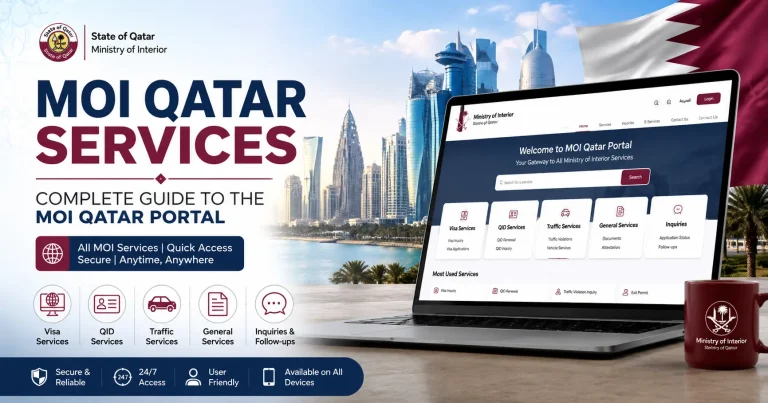
The MOI Qatar Visa portal is the official platform for checking visa approvals, printing visas, tracking application progress, and verifying entry validity. Whether you want to perform an MOI Qatar visa status check or an MOI Qatar online visa check, the process is quick and completely free.
In this updated 2026 guide, you will learn:
What to do after visa approval
How to check Qatar visa status on the MOI portal
How to use the QVC website for medical and biometrics tracking
How to check visa information through the Metrash2 app
Common Qatar visa errors and their solutions
Passport number formats for different countries
Why Use Passport Number for Qatar Visa Check?
Before your visa is officially issued, you usually do not have:
- Visa Number
- QID Number
- Printable visa copy
That is why most applicants use their passport number to check their application progress online.
| Situation | Best Option |
|---|---|
| Visa still under processing | Passport Number |
| Visa already issued | Visa Number |
| Living inside Qatar | QID Number |
| Waiting outside Qatar | Passport Number |
Important Passport Number Rules
Many applicants receive “No Record Found” errors because they enter their passport incorrectly.
Before checking your visa status, make sure:
- Use CAPITAL letters only
- Do not use spaces
- Do not add dashes (-)
- Enter the passport exactly as printed
Examples
| Country | Example Format |
| Pakistan | AB1234567 |
| India | A1234567 |
| Nepal | BA1234567 |
| Bangladesh | BF1234567 |
MOI Qatar Visa Check Online (Official Method)
The Ministry of Interior (MOI) portal is the most trusted and official way to check your Qatar visa status online. It works for all nationalities and all visa types, 24 hours a day.
Best for: Work visa, family visa, tourist visa, all nationalities.
Step-by-Step Guide for MOI Portal
The MOI Qatar Visa Inquiry service allows applicants to check their visa status using a passport number or visa number directly from the official government portal.
Step 1: Open the official MOI Qatar website.
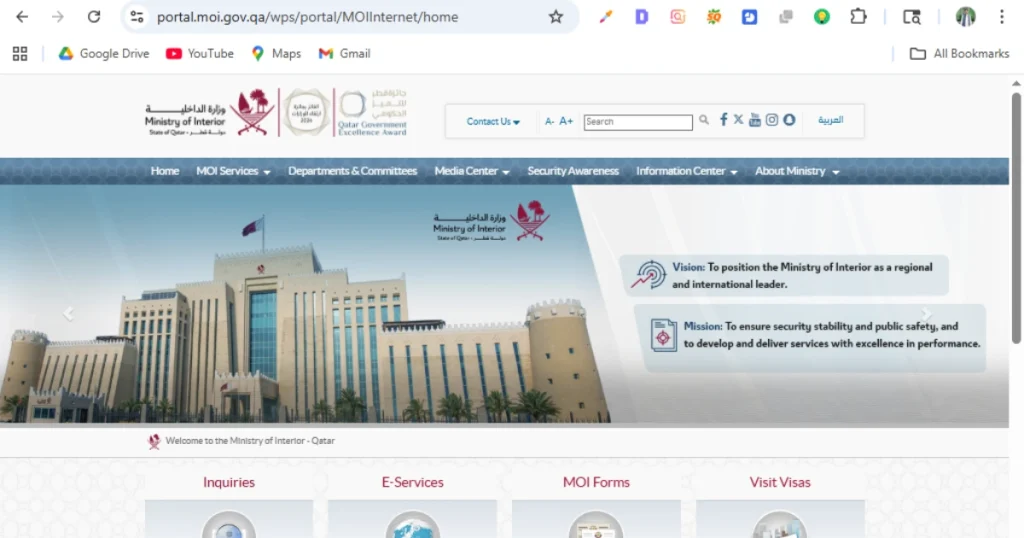
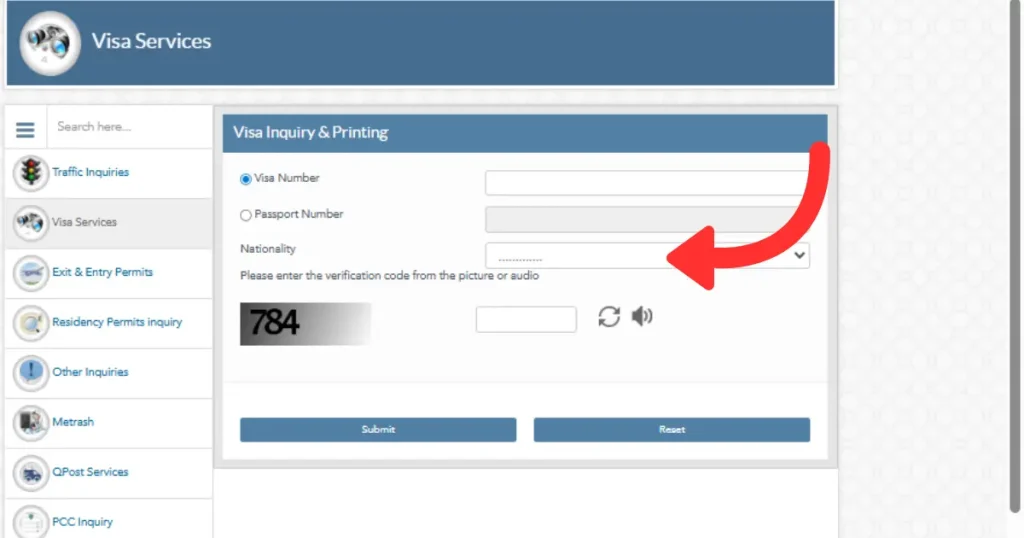
Step 2: Navigate to: Inquiries → Visa Services → Visa Inquiry & Printing
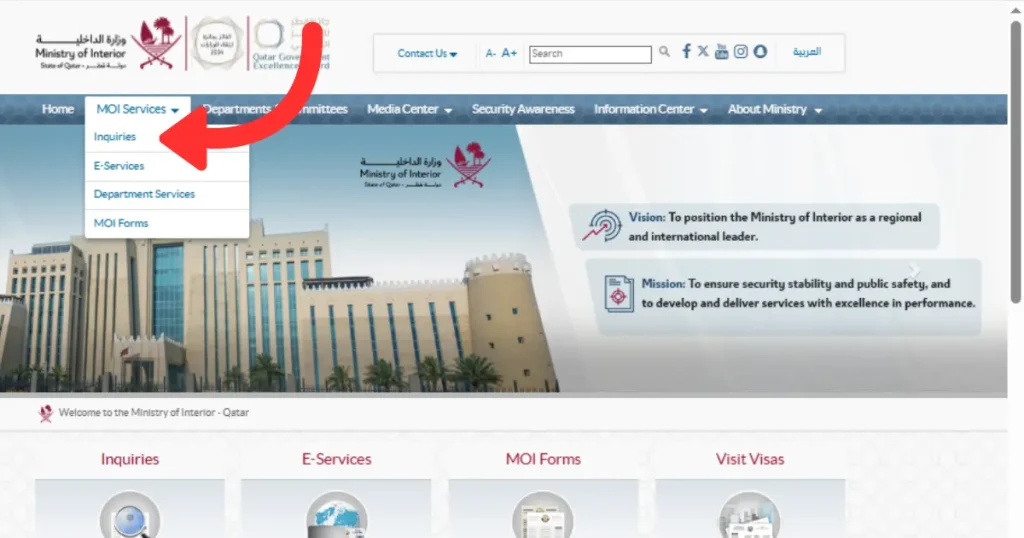
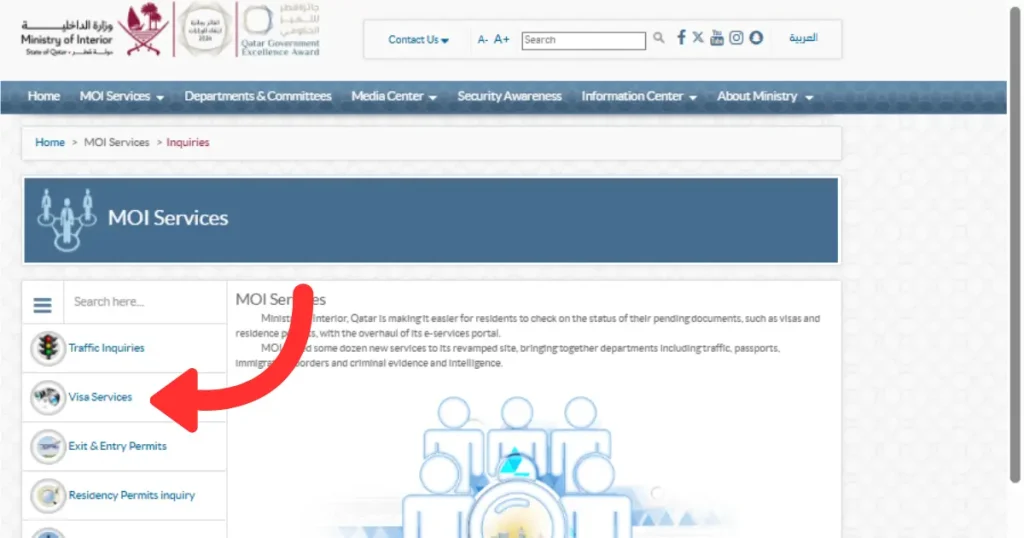
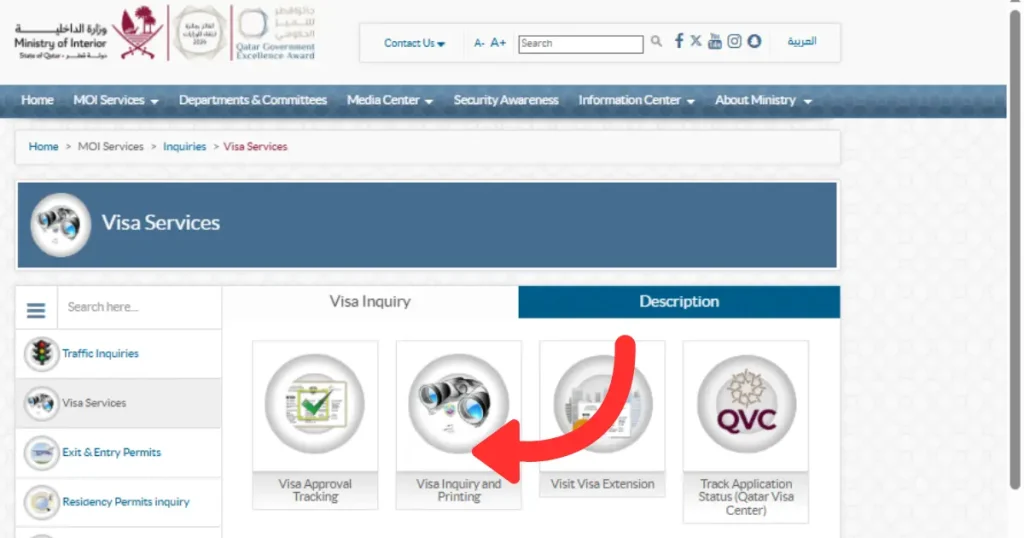
Step 3: Select “Passport Number” as your search option (not Visa Number).
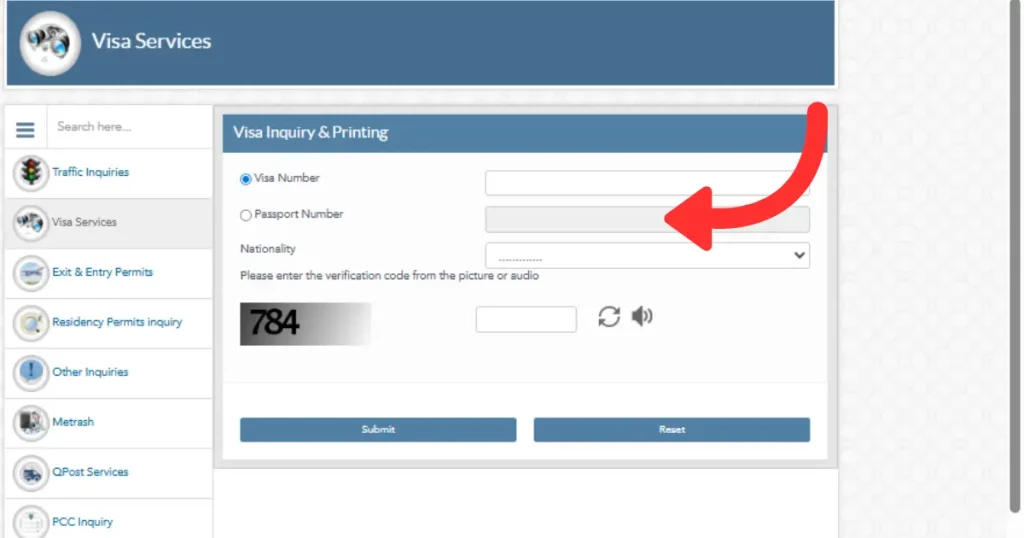
Step 4: Enter your passport number, nationality, and the CAPTCHA code.
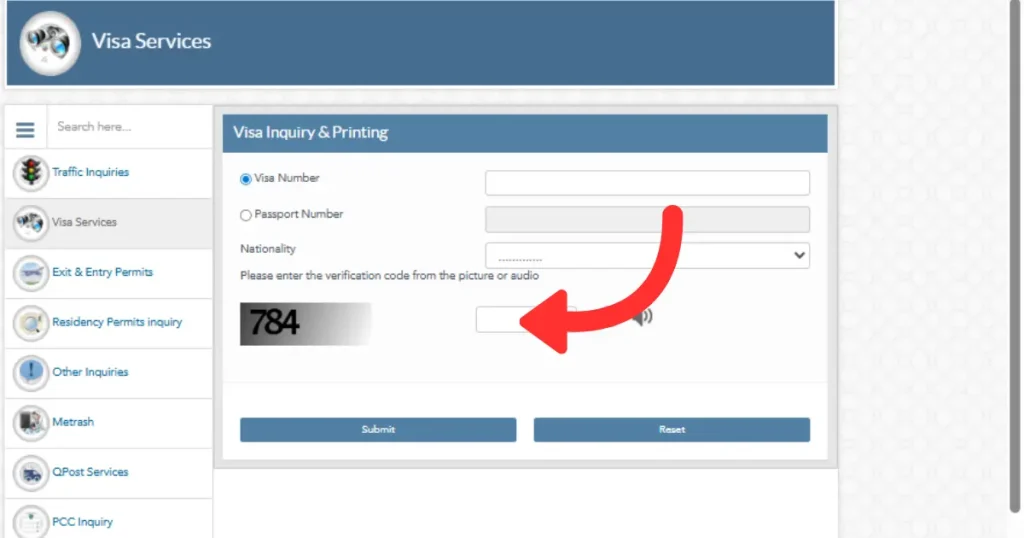
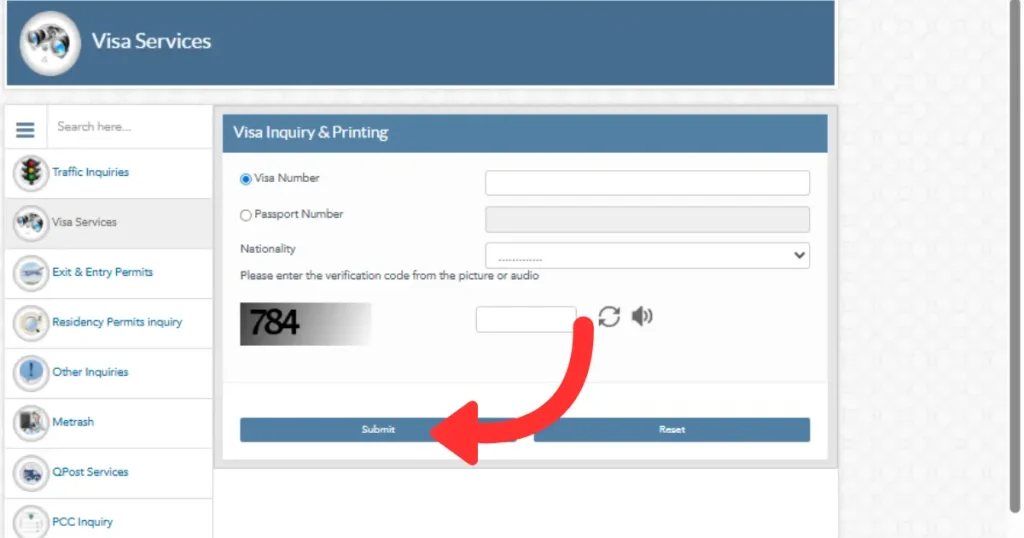
Step 5: Click Submit to view your Qatar visa status instantly.
MOI CAPTCHA Tips
The MOI portal CAPTCHA expires very quickly. Follow these steps to avoid errors:
- Fill in your passport number and nationality first
- Enter the CAPTCHA code last
- Submit the form immediately
- If it expires, refresh the page and try again
Information Shown After MOI Qatar Check Visa Status
After a successful check, the MOI portal displays:
- Visa status and visa number
- Visa type and sponsor details
- Entry validity and visa expiry date
- Single or multiple entry status
- Remaining permitted stay duration
MOI Qatar Visa Print Service
Once your Qatar visa is approved, you can use the MOI Qatar Visa Print service to download and print your visa copy directly from the official Ministry of Interior portal. Applicants can print their approved work visa, family visa, tourist visa, and other visa categories for travel and verification purposes.
To print your visa:
- Visit the MOI Qatar Visa Inquiry & Printing page.
- Enter your Passport Number or Visa Number.
- Complete the CAPTCHA verification.
- Click Submit.
- Download and print your approved visa in PDF format.
The MOI Qatar print visa facility is available online and allows applicants to verify sponsor details, visa validity, and entry dates before travelling.
he MOI Qatar Government Visa Check system is operated by the Ministry of Interior and provides real-time visa information for applicants worldwid
Method 2 — Check Qatar Visa Through QVC Portal
The Qatar Visa Center (QVC) portal is specifically for work visa applicants outside Qatar. It shows pre-arrival processing steps including medical and biometrics status — information the MOI portal does not provide.
MOI vs QVC — Key Differences
| Feature | MOI Portal | QVC Portal |
|---|---|---|
| Final visa approval | ✅ Yes | ❌ No |
| Medical status | ❌ No | ✅ Yes |
| Biometrics status | ❌ No | ✅ Yes |
| Passport number check | ✅ Yes | ✅ Yes |
| Available worldwide | ✅ Yes | Limited countries |
How to Use QVC Portal Step by Step
Step 1: Visit the official Qatar Visa Center website.
Step 2: Select your country and preferred language.
Step 3: Click on Track Application.
Step 4: Enter your Passport Number and Visa Reference Number (VRN).
Step 5: Complete the CAPTCHA and view your application status.
QVC Status Meanings Explained
| Status | Meaning |
|---|---|
| Appointment Pending | QVC appointment not yet booked |
| Biometrics Pending | Fingerprints not yet completed |
| Biometrics Completed | Fingerprints successfully done |
| Medical Pending | Medical test not yet completed |
| Medical Passed | Medical test cleared |
| Medical Failed | Medical issue detected |
| Application Completed | Pre-arrival process complete |
Important: “Application Completed” on QVC does not mean your visa is issued. You must still verify final approval on the MOI portal.
Method 3 — Check Qatar Visa Using Metrash App
The Metrash2 app is designed primarily for people already inside Qatar — residents, QID holders, and those with a Qatar mobile number.
How to Download and Use Metrash
Step 1: Search for Metrash2 on Google Play Store or Apple App Store and install it.
Step 2: Log in using your QID Number and complete OTP verification.
Step 3: Navigate to: Visa Services → Visa Inquiry, then enter your passport number.
Understanding MOI Qatar Visa Under Process Status
If your MOI Qatar visa status shows “Under Process”, it means your visa application is still being reviewed by the relevant authorities. Processing times may vary depending on the visa type and supporting documentation.
Common Errors and Fixes
Error 1 — No Record Found
Causes: Wrong passport format, wrong nationality selected, lowercase letters, or spaces added.
Fix: Enter your passport number exactly as printed. Use all CAPITAL letters with no spaces or dashes.
Error 2 — Invalid CAPTCHA
Fix: Refresh the page, fill your details first, then enter the CAPTCHA last and submit immediately.
Error 3 — Visa Approved But Cannot Print
Cause: Your sponsor has not paid the visa issuance fee.
Fix: Contact your employer — they must pay the pending fee through Metrash2.
Error 4 — MOI Website Not Working
Fixes: Use Google Chrome, try during off-peak hours, or switch to the Metrash2 app.
Error 5 — QVC Status Stuck
Fixes: Confirm your biometrics appointment was completed, confirm your medical test is done, and double-check your VRN number.
What to Do After Qatar Visa Approval
- Print your visa — Download the PDF from the MOI portal and keep printed copies.
- Check the Entry Validity Date — You must travel before this deadline, not just apply.
- Verify sponsor details — Match your employer’s name and QID number on the visa carefully.
- Confirm QVC completion — QVC should show “Application Completed.”
- Book your flight — Do not delay; missing the entry validity date means reapplying.
- Complete medical after arrival — Book your post-arrival medical through the Metrash2 app.
Frequently Asked Questions (FAQs)
Is Qatar visa check by passport number free?
Yes — completely free through the official MOI portal, QVC website, and Metrash2 app. Never pay an agent just to check your visa status.
Can I check Qatar visa status from outside Qatar?
Yes. The MOI portal is accessible worldwide, 24 hours a day, 7 days a week.
Why is my Qatar visa not showing?
The most common reason is an incorrect passport format — wrong letter casing, spaces, or dashes. It can also be a delayed system update. Recheck the format and try again after 24 hours.
What is the difference between QVC and MOI?
QVC tracks your pre-arrival steps: medical tests and biometrics. MOI confirms your final visa approval. Always check both.
My visa shows Approved but the print button is not working. Why?
Your sponsor has not yet paid the visa issuance fee. Contact your employer to resolve this through Metrash2.
How many days do I have to enter Qatar after approval?
You must enter Qatar before the Entry Validity Date printed on your visa. This date is shown on the MOI portal after approval.
Which Qatar Visa Types Can Be Checked by Passport Number?
| Visa Type | Passport Check Available |
| Work Visa | ✅ Yes |
| Family Visa | ✅ Yes |
| Tourist Visa | ✅ Yes |
| Transit Visa | ✅ Yes |
| Student Visa | ✅ Yes |
| Residence Permit | ✅ Yes |
| Business Visa | ✅ Yes |
| Domestic Worker Visa | ✅ Yes |
Final Words
Checking your Qatar visa status by passport number is simple, fast, and completely free. Use the official MOI portal for final approval status, QVC for medical and biometrics tracking, and Metrash2 if you are already inside Qatar. Always enter your passport number in the correct format — capital letters, no spaces, no dashes — to avoid the “No Record Found” error.