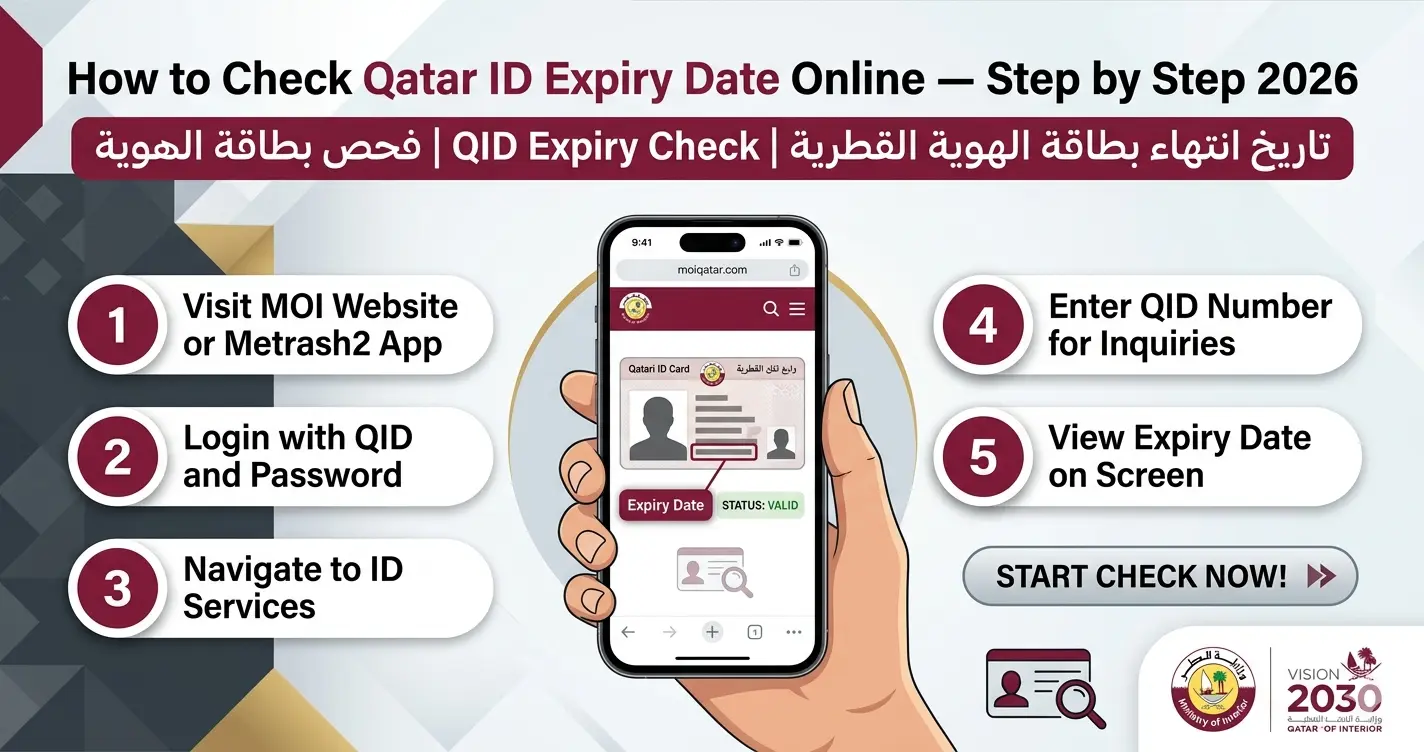
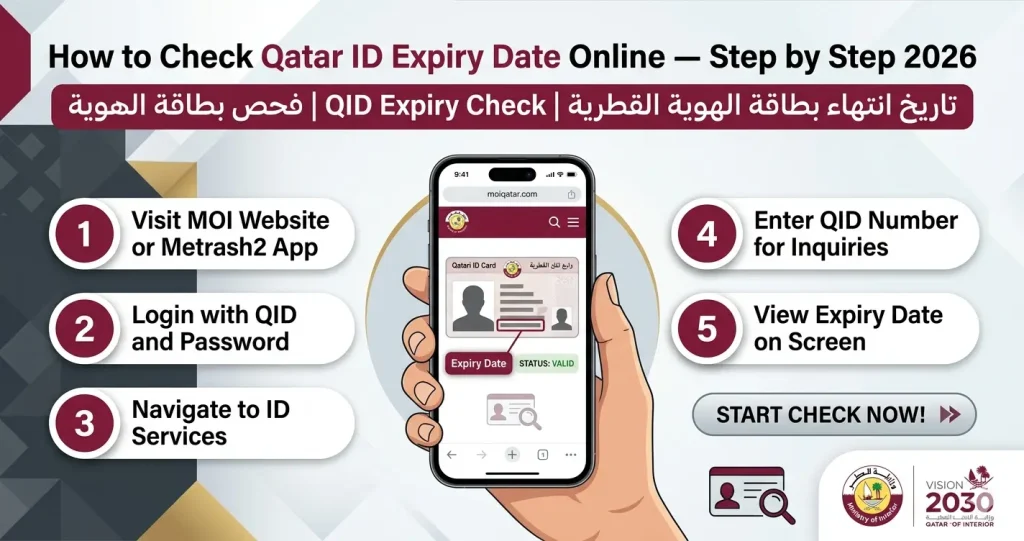
How to Check Qatar ID Expiry Date Online — Step by Step 2026
تاريخ انتهاء بطاقة الهوية القطرية | QID Expiry Check | فحص بطاقة الهوية
Check your Qatar ID expiry date in under 60 seconds — free, no login, works from any country. Official MOI Qatar methods for 2026.
Why Checking Your Qatar ID Expiry Date Matters
Most residents in Qatar make one critical mistake — they wait for their employer to tell them when their QID is expiring. That mistake costs QAR 10 per day in fines the moment your card crosses its expiry date. No grace period. No warning SMS. No email from MOI.
Your Qatar ID expiry date (تاريخ انتهاء بطاقة الهوية) is tied to everything: your bank account, your driving license, your ability to board a flight home, and even getting treated at a hospital. One expired day and all of these start shutting down — automatically, without notice.
The good news? Checking your QID expiry date takes under 60 seconds. MOI Qatar gives you five completely free ways to do it. This guide covers all of them, step by step.
Method 1 — Check Qatar ID Expiry Date on MOI Portal (Fastest Method)
This is the fastest method. No login. No registration. Works 24/7 from anywhere in the world — including outside Qatar.
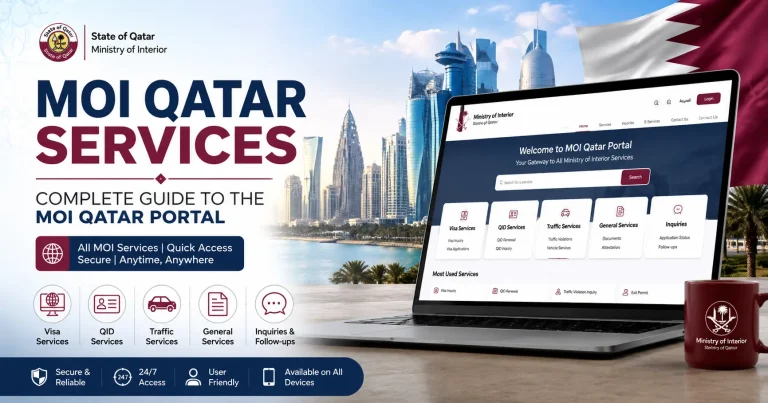
Step 1: Open www.moi.gov.qa in your browser. Google Chrome or Firefox works best.
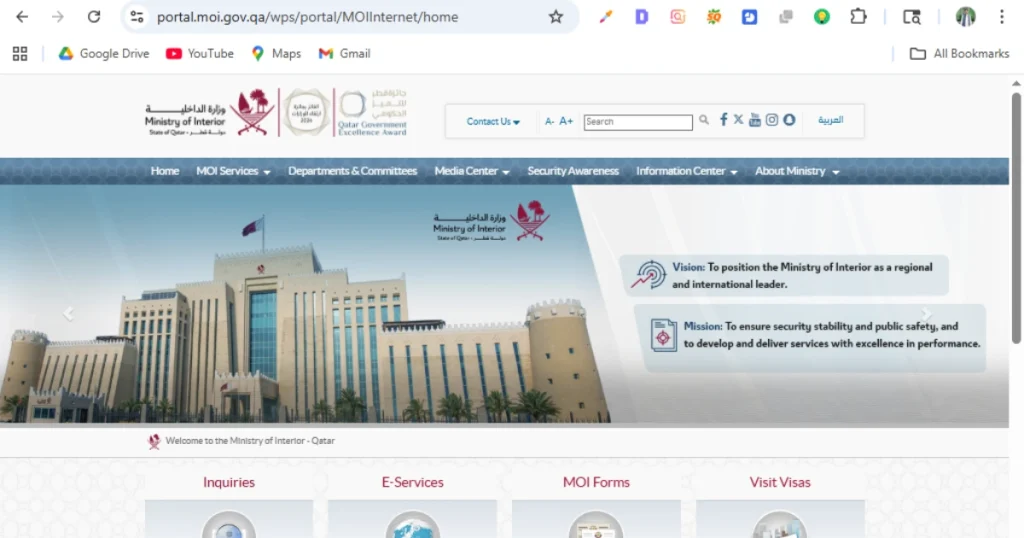
Step 2: Select your language — English or Arabic — from the top corner of the page.
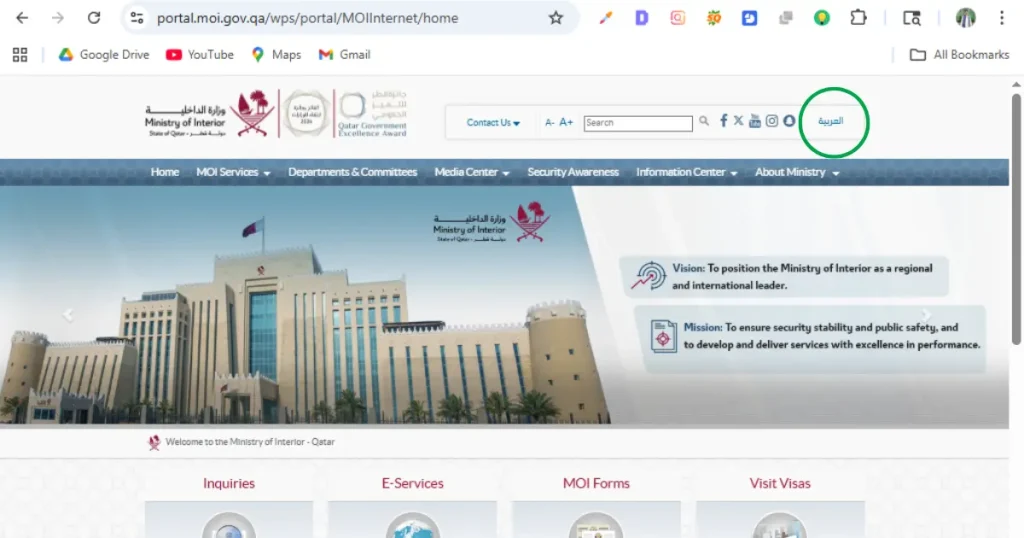
Step 3: Click “Inquiries” (the magnifying glass icon) on the homepage or top navigation.
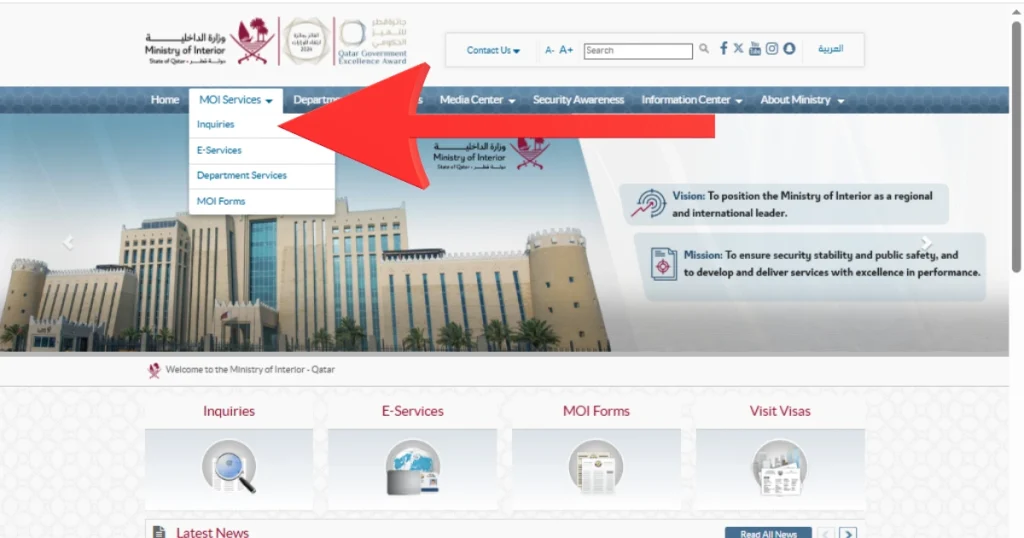
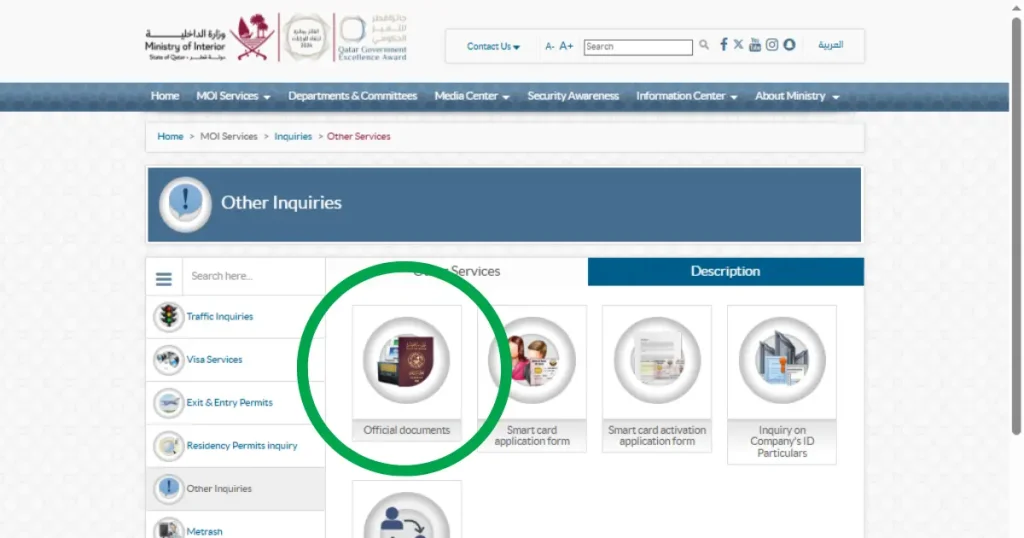
Step 4: From the left sidebar, click “Other Inquiries” → then select “Official Documents” from the five options that appear.
Step 5: Click the radio button for “QID Number.” Enter your 11-digit Qatar ID number exactly as it appears on your physical card — no spaces, no dashes.
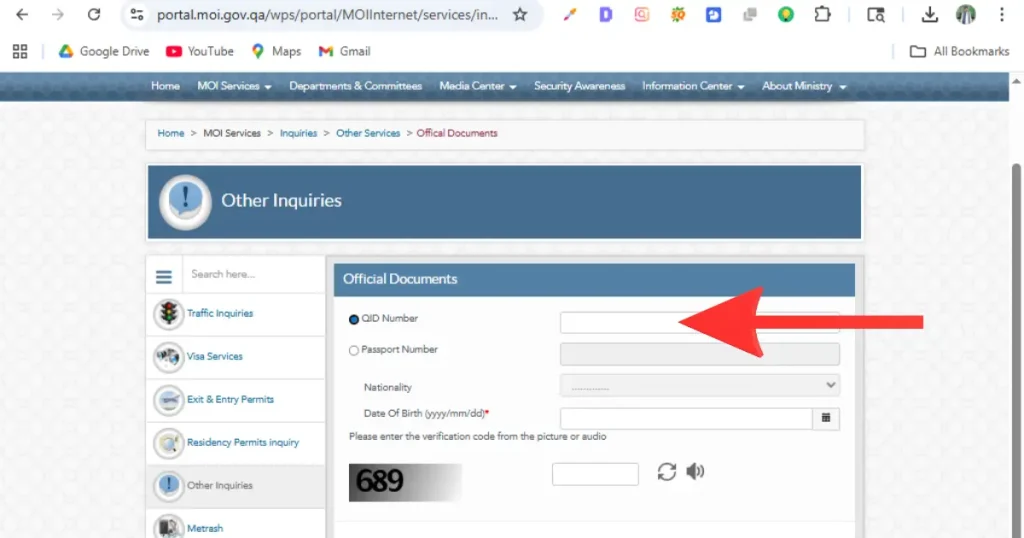
Step 6 — CAPTCHA (Critical): Fill in all your details first. Then read the CAPTCHA code and type it immediately. Click “Search” before it expires (approximately 30 seconds). If the CAPTCHA times out, click Reset and start again.
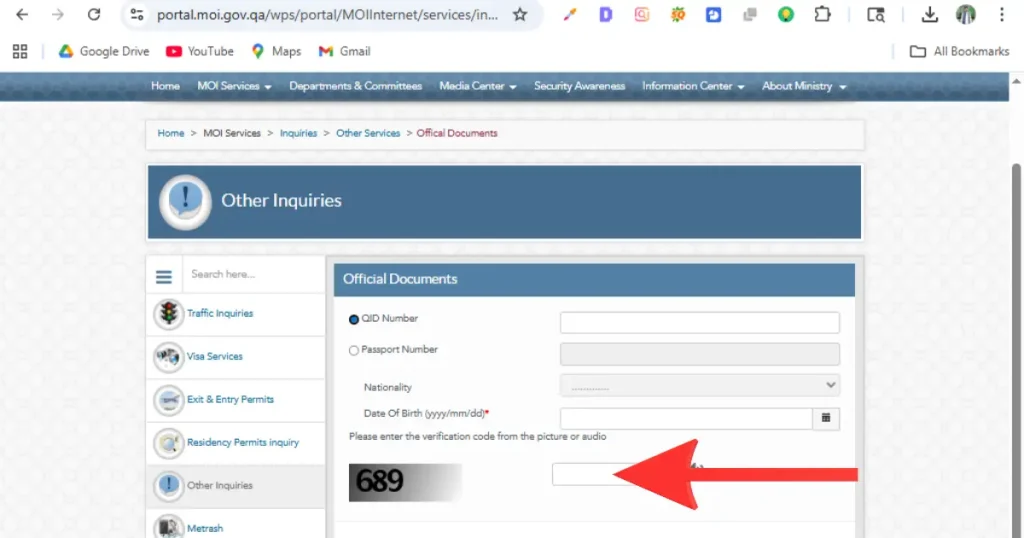
Step 7: Your result screen will show:
- QID status (Active / Expired / Under Process / etc.)
- QID expiry date ✅
- Passport expiry date
- Visa expiry date
- Driving license expiry date
- Sponsor / employer information
- Nationality
This is the most complete expiry check available — one search shows all your document dates at once.
Method 2 — Check Qatar ID Expiry by Passport Number (No QID Needed)
If you do not have your QID number — for example, you are a new expat waiting for your first card, or you have misplaced your physical QID — you can still check using your passport number.
Step 1: Follow Steps 1–4 from Method 1 above.
Step 2: On the inquiry page, click the radio button for “Passport Number” instead of QID Number.
Step 3: Enter your passport number exactly as it appears on your passport — letter for letter, digit for digit. No spaces.
Step 4 — Most Common Error: Select your nationality from the dropdown. This single step is responsible for nearly all “No Record Found” errors. The nationality you choose must match your passport nationality exactly.
Step 5: Enter the CAPTCHA immediately and click Search. Your QID and expiry details will appear.
Method 3 — Check QID Expiry Date via Metrash App (Best for Mobile)
Important 2026 Update: The old Metrash2 app is officially discontinued. Download the new Metrash app from the App Store or Google Play Store. Publisher must be: Ministry of Interior – Qatar. Requires Android 10+ or iOS 13+.
Step 1: Search “Metrash” on your app store and install the official app.
Step 2: Register with your 11-digit QID number, QID expiry date, and your mobile number (must be registered under your name with Ooredoo or Vodafone). An SMS activation code will arrive from 92992.
Step 3: Log in with your QID number and PIN, or use fingerprint / Face ID.
Step 4: Tap “Wallet” → select “ID Card” to view your full QID details, including expiry date, current status, and upcoming renewal reminders.
The Metrash app also shows visa status, driving license expiry, vehicle registration, traffic fines, and lets you renew your QID and pay fines directly — all from your phone.
Method 4 — Check Qatar ID Expiry by SMS (No Internet Required)
No internet? No problem. This method works anywhere — travelling, low data, or just faster for a quick check.
Send your 11-digit QID number to:
92992
You will receive an automated reply within 1–2 minutes with your QID status and expiry date.
Method 5 — Phone Hotline & In-Person Inquiry
| Contact | Number | Hours |
|---|---|---|
| MOI Main Hotline | 2342000 | 24/7 |
| MOI Alternative Line | 2367111 | 24/7 |
| MOI WhatsApp | via moi.gov.qa | Working hours |
For in-person inquiries, visit any MOI Service Center with your QID and passport. Always book an appointment through the Metrash app first — walk-in queues are long, especially on Sundays (Qatar’s first working day). Appointment holders are always served first.
MOI Service Centers:
| Center | Location | Hours |
|---|---|---|
| Al Gharrafa | North Doha | Sun–Thu, 7AM–2PM |
| Mesaimeer | South Doha, Mesaimeer Road | Sun–Thu, 7AM–2PM |
| Al Wakra | Al Wakra City | Sun–Thu, 7AM–2PM |
| Al Rayyan | West Doha | Sun–Thu, 7AM–2PM |
| Lusail | Lusail City | Sun–Thu, 7AM–2PM |
What the Qatar ID Expiry Status Labels Mean
When you check online, you will see one of these status labels:
| Status | What It Means | What You Must Do |
|---|---|---|
| Active / Valid | Your QID is current and fully valid | No action needed. Monitor expiry date monthly. |
| Under Process | Renewal submitted. MOI is processing it. | Wait 3–10 working days. Do NOT travel outside Qatar. |
| Ready for Collection | New card printed. Ready for delivery or pickup. | Track delivery on Metrash or collect from MOI center. |
| Expired | QID has passed expiry. Fines are running. | Renew immediately. QAR 10/day fine from expiry date. |
| Cancelled | Residency cancelled (job ended / sponsor withdrew). | Contact employer or visit MOI service center. |
| Blocked | Legal hold, court order, or unpaid fines. | Visit MOI in person immediately. Do NOT attempt to travel. |
| Under Renewal | Renewal in progress. Current QID stays valid. | Wait. You can travel normally during this status. |
| Invalid | Usually a data entry error on your end. | Click Reset. Re-enter details carefully. Check for typos. |
Qatar ID Expiry Fines — What Happens When You Miss It
| Situation | Fine | Additional Consequence |
|---|---|---|
| Expired Qatar ID (RP) | QAR 10 per day | Bank account freeze + driving license suspension |
| Working without valid QID | Heavy fine + deportation proceedings | Possible entry ban |
| Lost QID not reported | Fine at MOI discretion | Must report immediately + apply for replacement |
There is zero grace period. Fines start from the very first day after expiry.
Common Errors When Checking QID Expiry Date — And How to Fix Them
Error: “No Record Found” or “Invalid QID” Check your QID number digit by digit. If using passport number, verify your nationality selection carefully — it must match exactly. If your application was just submitted, wait 24–48 hours and try again.
Error: CAPTCHA Keeps Expiring Fill in your QID/passport number first, THEN immediately read the CAPTCHA and type it, then click Search — all without any delay. The CAPTCHA window is approximately 30 seconds.
Error: MOI Website Not Loading The MOI portal goes into maintenance between 12:00 AM – 4:00 AM Qatar time. Clear your browser cache and try again, or switch to the Metrash app as an alternative.
Error: Status Shows “Expired” but You Are Still in Qatar Your employer’s PRO has likely not submitted your renewal yet. Contact your employer immediately. Fines are running from the expiry date. Do not travel until renewal is confirmed.
Error: Status Shows “Blocked” Visit an MOI service center in person with your passport and QID. Do not attempt to exit Qatar. Book a Metrash appointment first to reduce wait time.
How to Renew Qatar ID After Checking Expiry Date
Once you have checked your expiry date and it is approaching, you can renew completely online:
Step 1: Log in to the Metrash app or go to portal.moi.gov.qa.
Step 2: Select “Residency Services” → “Renew ID.” Your current details will be pre-filled.
Step 3: Choose your renewal duration — 1, 2, or 3 years.
Step 4: Upload required documents: valid passport, updated medical insurance, employment contract (if applicable for your residency category).
Step 5: Choose delivery method — home delivery via Qatar Post or collection from MOI center.
Step 6: Pay online by debit or credit card.
| Renewal Detail | 2026 Information |
|---|---|
| Start Renewal | At least 7–10 days before expiry date |
| Application Fee | Approx. QAR 100 |
| Renewal Fee | QAR 150–600 (varies by residency category) |
| Replacement (lost/damaged) | Approx. QAR 200 |
| Processing Time | 3–10 working days |
| Late Fine | QAR 10 per day after expiry (no grace period) |
| Max QIDs per Transaction | 5 (personal) / 20 (company) |
Frequently Asked Questions
How do I check my Qatar ID expiry date online in 2026?
Go to moi.gov.qa → Inquiries → Other Inquiries → Official Documents → Enter your 11-digit QID number → Complete CAPTCHA → Click Search. Your QID expiry date appears instantly. Free, 24/7, accessible from any country.
Can I check Qatar ID expiry date without my QID number?
Yes. On the MOI inquiry page, select “Passport Number.” Enter your passport number and select your nationality from the dropdown carefully. This works even if you have not yet received your physical QID card.
How to check Qatar ID expiry date by SMS?
Send your 11-digit QID number to 92992. You will receive an automated reply with your ID status and expiry date within 1–2 minutes. No internet required.
What happens if my Qatar ID expires?
QAR 10 per day fine starts from the expiry date — with no grace period. Your bank account freezes automatically, your driving license is suspended, and you cannot exit Qatar until the situation is resolved.
Is the Metrash2 app still working in 2026?
No. Metrash2 is officially discontinued. Download the new Metrash app (publisher: Ministry of Interior – Qatar) from your app store.
Can I check my Qatar ID expiry date from outside Qatar?
Yes. The MOI portal (moi.gov.qa) is accessible from any country, 24/7, completely free. No physical presence in Qatar is required.
How many days before expiry should I renew my Qatar ID?
Start at least 7–10 days before the expiry date. Renewal processing takes 3–10 working days. Starting earlier gives buffer against delays.
What does “Under Process” mean when I check my QID expiry?
It means your renewal application has been submitted to MOI and is currently being reviewed. Your existing QID remains valid during this period. Do not travel outside Qatar until the status changes to Active or Ready for Collection.
Final Word
Your Qatar ID expiry date is not just a number on a card — it is the key that unlocks your entire life in Qatar. Banking, healthcare, travel, employment, driving — all of it depends on that date staying current.
The MOI portal at moi.gov.qa is the fastest way to check: no login, no registration, just your 11-digit QID number and a CAPTCHA. The Metrash app adds the convenience of automatic renewal reminders so you never get caught off-guard. And if you have no internet, a single SMS to 92992 gives you the answer in under two minutes.
Check your QID expiry date today. Then set a monthly reminder. In Qatar, residency compliance is your own responsibility — your employer’s reminder is never guaranteed to come on time.