How to Download National Address Certificate via Metrash in Qatar (2026 Complete Guide)
You’re standing at a bank counter in Doha. The officer looks up and says, “Do you have your National Address Certificate?” Your heart sinks. You’ve never heard of it. Or maybe you have — but you have no idea how to get it quickly.
Sound familiar?
If you live in Qatar — whether you’re a Qatari national or an expatriate — the National Address Certificate (NAC) is one of those essential documents that shows up when you least expect it. Banks want it. Government departments ask for it. Health services may require it. And yet, most residents don’t have it handy.
The good news? Downloading your National Address Certificate via Metrash takes less than five minutes, costs only QR 10, and lands straight in your email inbox. No queues. No paperwork. No stress.
This guide walks you through everything — what the certificate is, who needs it, exactly how to get it step by step, and answers to every question you might have along the way.
What Is the National Address Certificate in Qatar?
The Qatar National Address Certificate (NAC) is an official document issued by the Ministry of Interior (MOI). It serves as formal proof of your residential address in Qatar and is recognised across both government and private sectors.
Think of it as your address identity card — a verified, official record that confirms where you live, backed by the full authority of the MOI.
What Information Does It Contain?
Your National Address Certificate includes:
- Personal details: Full name, Qatar ID (QID) number, mobile number, email address, and PO Box number
- Address details: Unit number, building number, street number, zone number, and electricity account number
- Address type: Home address, work address, or outside address (you can include more than one)
The certificate is available in both Arabic and English, giving you flexibility depending on the institution you are submitting it to.
Why Do You Need a National Address Certificate?
Before jumping into the how-to, it’s worth understanding just how important this document has become for everyday life in Qatar.
Common Uses of the National Address Certificate
Banking Services Opening a new bank account in Qatar almost always requires address verification. The NAC is widely accepted as proof of residence by all major banks, including QNB, Commercial Bank, and Doha Bank.
Government Services Whether you’re applying for a new service through Hukoomi or dealing with official government paperwork, your national address may need to be verified.
Health Card Applications Applying for a Hamad Health Card or similar health services may require you to submit your NAC as part of the process.
Telecom and Utility Subscriptions Some telecom providers and utility companies require address verification when you sign up for services.
Employment and HR Processes Many companies in Qatar request the certificate from new employees as part of their onboarding documentation.
Legal and Notarial Processes Notary offices, courts, and legal firms may ask for it when processing official documents.
In short — keep your NAC updated and within reach. You’ll thank yourself later.
Who Can Apply for a National Address Certificate in Qatar?
Both Qatari citizens and resident expatriates with a valid Qatar ID are eligible to apply for the NAC. Companies and organisations registered in Qatar with a valid Commercial Registration (CR) number can also apply for an establishment-level certificate.
Eligibility Requirements
To apply, you must:
- Hold a valid Qatar ID (QID)
- Have a mobile number registered with Metrash
- Have a registered national address on the MOI system
- Have an active email address (the certificate will be sent here)
- Have a bank card to pay the QR 10 fee
Important: If you have not yet registered your national address with the MOI, you must do so before you can download the certificate. We cover this in the FAQs section below.
How to Download National Address Certificate via Metrash — Step-by-Step
The entire process is done through the Metrash mobile app, which is the Ministry of Interior’s official digital services platform. It’s available on both Android (Google Play Store) and iOS (Apple App Store).
Here is the complete step-by-step process:
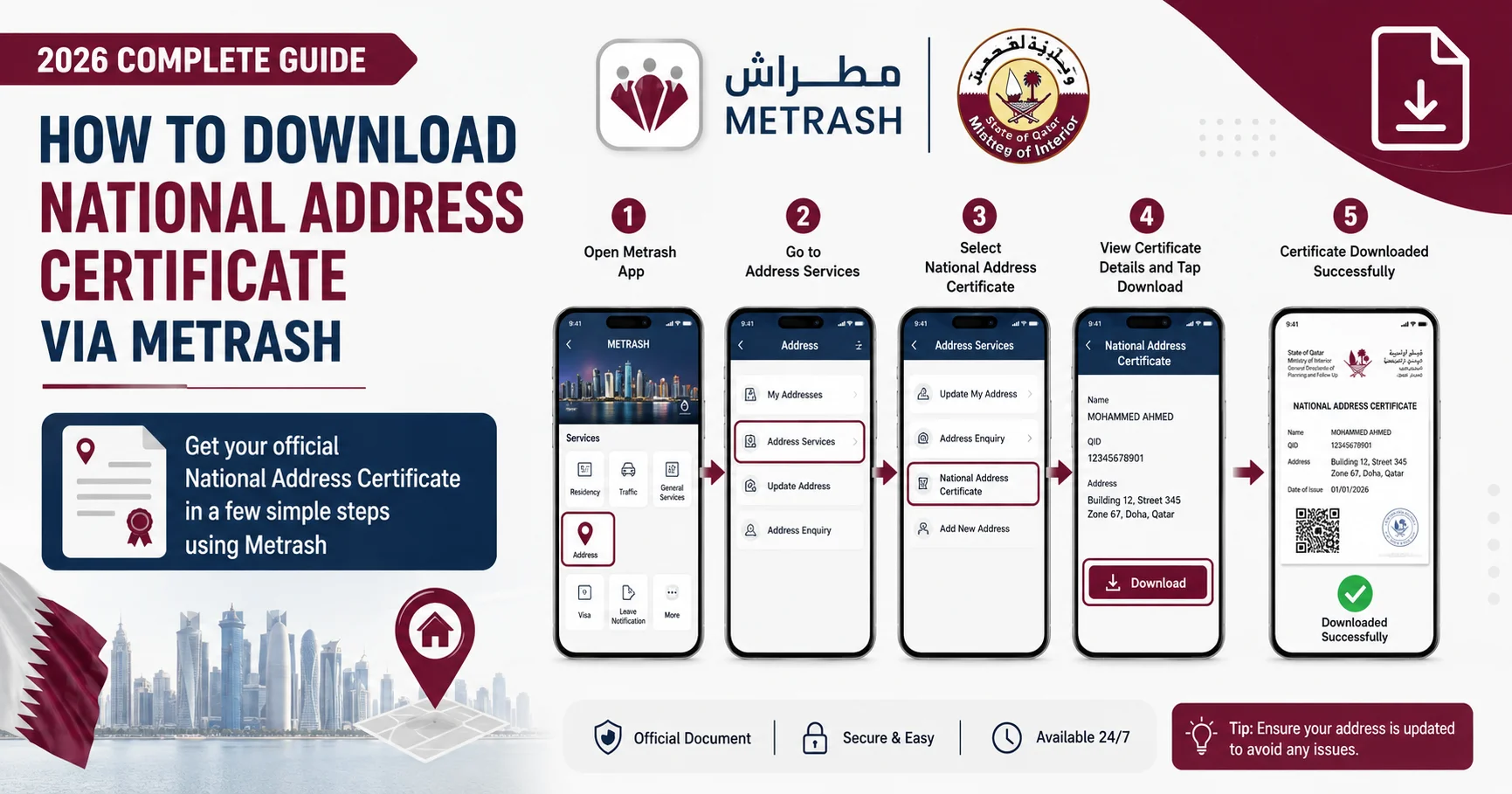
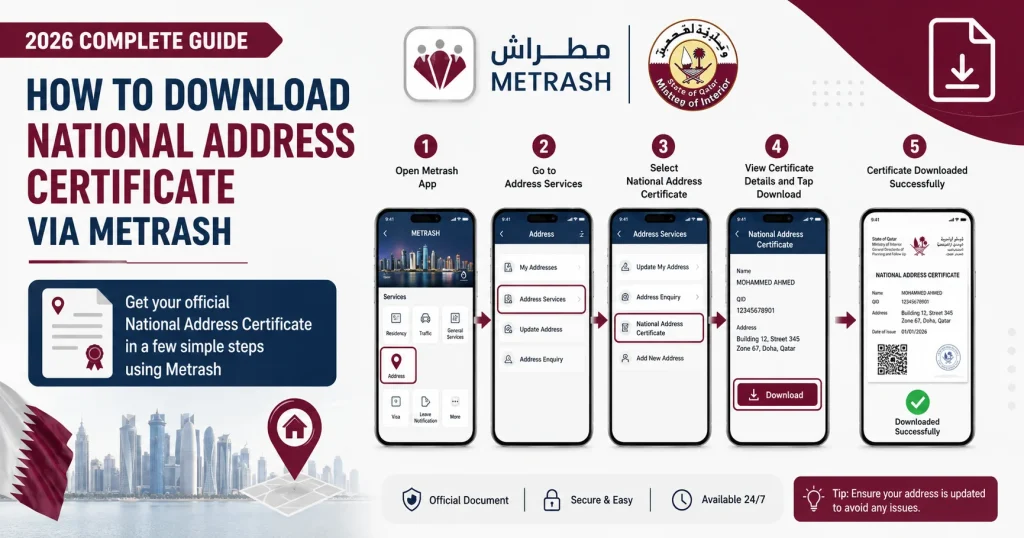
Step 1: Download and Open the Metrash App
If you don’t already have Metrash installed, download it from the Google Play Store or Apple App Store. Search for “Metrash” — the official app by Qatar’s Ministry of Interior.
Once installed, open the app and log in using your Qatar ID number and password. If you haven’t registered yet, complete the quick registration process first using your QID.
Step 2: Navigate to “National Address” on the Home Screen
After logging in, you’ll see the main homepage of the Metrash app. Look for the option labelled “National Address” and tap on it. This section houses all services related to your national address registration and certificates.
Step 3: Select “Add National Address” (or Proceed if Already Registered)
If your address is already registered, you’ll see it listed here. If not, select “Add National Address” and complete the registration before proceeding.
Tap on “National Address Certificate” to begin the certificate application.
Step 4: Choose the Contents of Your Certificate
Here you’ll be asked to select what information you want included in your certificate. You can choose one or more of the following:
- Home Address — Your registered residential address
- Work Address — Your employer’s address (if registered)
- Outside Address — An address outside Qatar (if applicable)
Select all that apply to your situation. Most applicants choose Home Address for standard use.
Step 5: Select Your Preferred Language
Choose whether you want your certificate issued in Arabic or English. For most official submissions to banks and private sector companies, English is typically preferred. For government transactions conducted in Arabic, choose Arabic.
Step 6: Enter Your Email Address
Provide the email address where you’d like the certificate to be delivered. Double-check the spelling — the certificate will be sent directly to this inbox once the payment is processed.
Step 7: Pay the QR 10 Fee
Select your bank card type and enter the required payment details. The fee is a flat QR 10 — roughly USD 2.75 — making this one of the most affordable official documents you’ll ever pay for.
Step 8: Submit and Receive Your Certificate
Once the payment is confirmed, your application is processed instantly. The National Address Certificate will arrive in your email inbox as a PDF within moments. Download it, save it, and you’re done.
A Faster Route: Applying via the Metrash Certificates Section
Some users find an even quicker path within Metrash:
- Log in to the Metrash app
- Select “Certificates” from the main page
- Tap on “Please Select” under service type
- Choose “National Address Certificate”
- Tap “Continue” and follow the remaining steps (language, email, payment)
Both routes lead to the same result — whichever feels more intuitive to you works perfectly.
Can You Also Get the Certificate from the MOI Website?
Yes. If you prefer a desktop experience, you can also apply through the official MOI e-services portal at moi.gov.qa. Log in with your Qatar ID, navigate to Residency Services, and select National Address services. The process is similar to the app.
You can also visit an MOI Service Centre in person if you encounter any technical issues or need assistance.
Certificate Fee and Validity: What You Need to Know
Fee
The National Address Certificate costs QR 10 — payable by bank card through the Metrash app or MOI portal.
Validity
The certificate is valid for three months (90 days) from the date of issuance. After this period, it expires and you’ll need to download a fresh one using the same process.
Updating Your Address
If your address changes — for example, if you move to a new apartment — you are required to update your national address within 30 days of the change. Failure to update within this window may result in penalties.
Serious note: Providing false or incorrect information when registering your national address carries a QR 10,000 fine. Always ensure your registered details are accurate.
National Address Certificate for Companies and Establishments
If you’re a business owner or company representative, you can also obtain an establishment-level certificate through Metrash. You’ll need:
- A valid Commercial Registration (CR) number
- The authorised signatory’s Qatar ID
- Registered business address on the MOI system
The process follows the same steps as individual applications but requires selecting the establishment option within the app.
What If You Haven’t Registered Your National Address Yet?
Before you can download a certificate, your address must be registered in the MOI system. Here’s how to register:
- Open the Metrash app and log in
- Go to National Address Services from the home page
- Select “National Address for Individuals”
- Select the Registration Service
- Enter your address details: zone number, building number, street number, and unit number (available on the blue building plate outside your building)
- Add your electricity account number
- Follow the on-screen prompts to complete registration
Alternatively, you can register through the MOI website using your QID.
Once your address is registered in the system, you can apply for the certificate immediately.
Tips to Make the Process Even Smoother
Keep your Metrash app updated. The MOI regularly improves the app. Running an outdated version may cause errors during payment or submission.
Have your electricity number ready. If registering your address for the first time, you’ll need the electricity account number associated with your unit. This is typically found on your KAHRAMAA bill.
Use a stable internet connection. The payment step requires a reliable connection to avoid transaction errors.
Check your spam folder. If your certificate doesn’t arrive in your inbox within a few minutes, check the spam or junk folder of your email account.
Save the PDF immediately. Once you download the certificate, save a copy on your phone and cloud storage. This saves you from re-downloading it when you need it urgently.
Frequently Asked Questions
How long does it take to get the National Address Certificate via Metrash?
The process takes just a few minutes. Once payment is confirmed, the certificate is issued and sent to your email instantly. There is no waiting period.
How much does the National Address Certificate cost in Qatar?
The certificate fee is QR 10, payable by debit or credit card through the Metrash app.
How long is the National Address Certificate valid?
The certificate is valid for three months (90 days) from the date it is issued. After expiry, you can easily download a new one through the same process.
Can expatriates get a National Address Certificate in Qatar?
Yes. Both Qatari citizens and resident expatriates with a valid Qatar ID are eligible to apply for the National Address Certificate via Metrash.
Is the digital certificate acceptable for official use?
Absolutely. The digital PDF copy of the National Address Certificate sent to your email is considered an official document and is accepted by banks, government departments, and other institutions across Qatar.
What if I don’t have my national address registered?
You must register your national address first before applying for the certificate. You can register through the Metrash app or the MOI website using your Qatar ID and address details.
Can I include more than one address on the certificate?
Yes. You can select multiple address types — home, work, and outside — to be included in a single certificate.
What should I do if I face a problem during the process?
Contact the Ministry of Interior’s dedicated helpline at 2342000 for assistance with national address registration or any issues encountered during the application.
Is there a fine for not updating my national address?
Yes. You are required to update your national address within 30 days of any change of residence. Providing incorrect information can result in a fine of up to QR 10,000.
Can companies apply for a National Address Certificate via Metrash?
Yes. Businesses and organisations registered in Qatar with a valid CR number can also apply for an establishment-level National Address Certificate through the Metrash app.
Do I need a new certificate every time I submit it somewhere?
Not necessarily. As long as your certificate is within its three-month validity period, the same document can be used for multiple submissions. Once it expires, download a fresh one.
Final Thoughts
The National Address Certificate via Metrash is one of those rare government services that actually does what it promises — fast, simple, and fully digital. No queues at a government office. No waiting days for processing. No running around collecting documents.
In under five minutes and for just QR 10, you get an officially recognised document delivered straight to your inbox. Whether you’re opening a bank account, applying for a health card, or dealing with any official formality in Qatar, your NAC has you covered.
The key things to remember: make sure your national address is registered on the MOI system, keep the certificate renewed every three months when needed, and update your address within 30 days whenever you move.
If you ever run into trouble, the MOI helpline at 2342000 is there to help.
Now that you know exactly how it works — go ahead and download yours today. It takes less time than making a cup of tea.